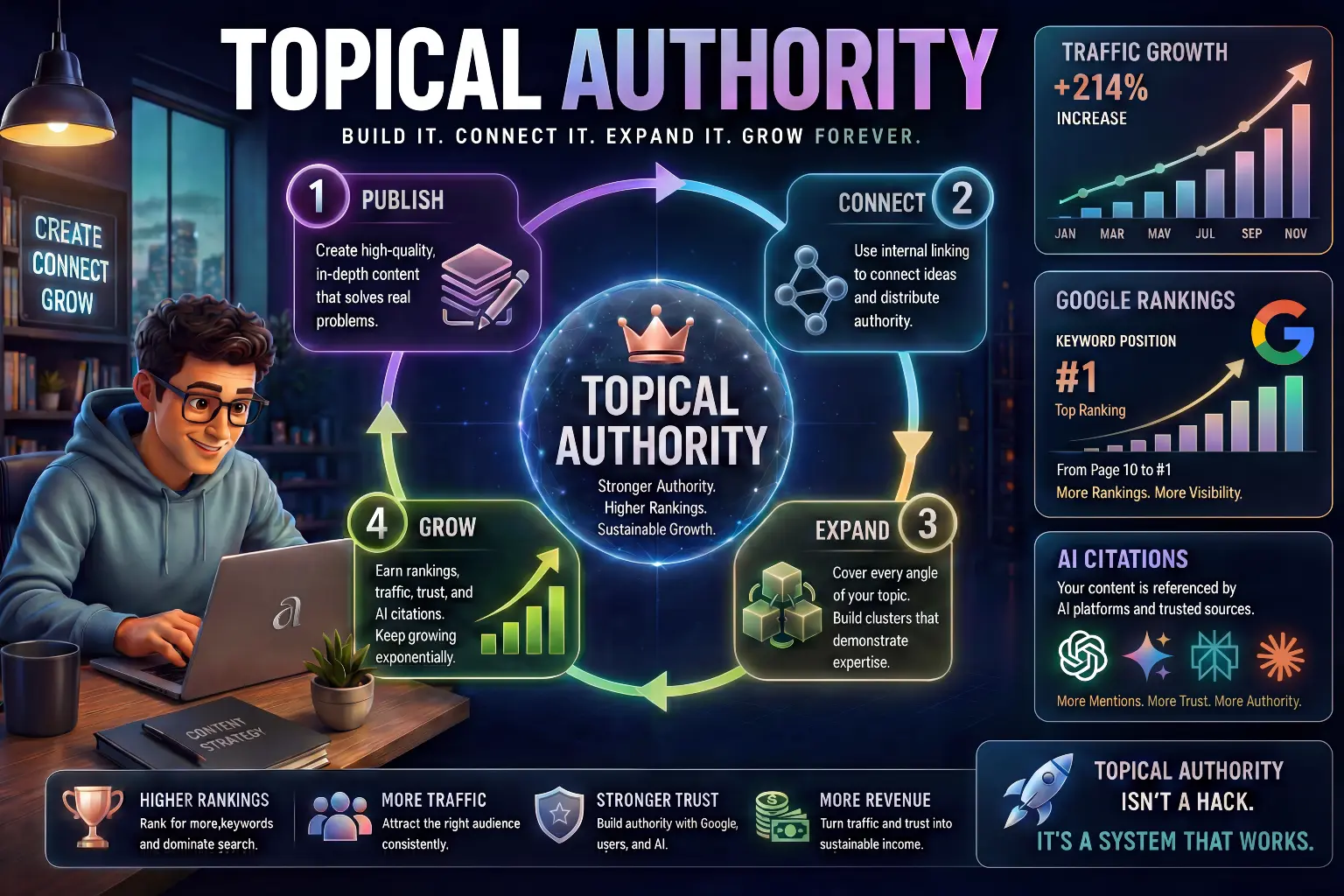
“This beginner-friendly guide explains how to do keyword research for blogging using AI in 2026, including finding low-competition keywords, understanding search intent, analyzing real ranking opportunities, and building a practical system that helps beginners write blog posts that actually rank on Google.”
If you have ever written a blog post that got zero visitors, keyword research is almost certainly the reason why.
Most beginners start blogging by writing about topics they find interesting. That feels natural. But interesting to you is not the same as searchable. Google only sends traffic to content that matches what real people are typing into the search bar. If your article does not match a real search query, it will stay invisible no matter how well it is written.
This is where keyword research comes in, and this is also where most beginners get confused. Keyword research sounds technical and complicated, but it does not have to be. With the help of AI tools, the process becomes much simpler, faster, and more practical even for complete beginners.
If you’re just starting your blogging journey, you can first read our beginner guide on How to start blogging with AI to understand the complete process.
What Is Keyword Research and Why It Matters for Bloggers

Keyword research is the process of finding the exact words and phrases that people type into Google when they are looking for information.
When someone searches “how to use AI for blogging,” that entire phrase is a keyword. Google matches that search to articles that are built around it. If your article uses that phrase naturally and covers the topic well, you have a real chance of appearing in the results.
For bloggers, keyword research matters for one very important reason: it tells you what to write before you write it. Instead of guessing what your audience wants, you research it first. This saves enormous amounts of time because you only write articles that people are actually looking for.
Think about it this way. You could spend five hours writing a detailed article about a topic that nobody is searching. Or you could spend thirty minutes on keyword research first, find a topic with real search demand, and then write the same quality article with a much higher chance of getting traffic. The effort is the same. The result is completely different.
Keyword research also helps you understand your readers better. When you see what people are searching, you start to understand what problems they are trying to solve, what questions they have, and what kind of answers they are looking for. That knowledge makes every article you write more useful and more relevant.
Why Most Beginners Skip Keyword Research (And Why That Is a Mistake)

Most beginners skip keyword research for one of three reasons.
The first reason is that it feels technical. Words like search volume, keyword difficulty, and SERP analysis sound like things only SEO experts understand. But these concepts are actually very simple once you break them down, and you do not need to master all of them to get started.
The second reason is impatience. Beginners are excited to write and publish. Doing research before writing feels like a delay. But this impatience is exactly what leads to articles that sit at the bottom of Google with no traffic for months or years.
The third reason is that beginners do not realize how much it matters. They assume that if their content is good enough, Google will find it. Unfortunately, that is not how it works. Google ranks content based on relevance and authority. If your article is not built around what people are searching, it simply does not appear.
Skipping keyword research is one of the most common reasons beginner blogs stay small. The good news is that once you start doing it consistently, even basic keyword research gives your content a significant advantage over most other beginner blogs.
How AI Makes Keyword Research Easier for Beginners
Traditional keyword research required expensive tools, complex spreadsheets, and a lot of SEO knowledge. That is no longer the case.
AI tools like ChatGPT and Perplexity AI can now help beginners generate keyword ideas, understand search intent, and organize topics in minutes. Instead of needing to know SEO inside out, you can simply describe your blog topic to an AI and ask it to suggest keywords that beginners might search for. The output is usually a strong starting list that you can then refine and validate.
AI also helps with the thinking process. When you are new to a topic, it can be difficult to imagine all the different angles people might search from. AI tools are trained on enormous amounts of text and can suggest keyword angles you would never have thought of yourself. This broadens your content ideas and helps you find opportunities your competitors may have missed.
The important thing to understand is that AI is a starting point, not a final answer. AI can suggest keywords, but it cannot always tell you exactly how competitive they are or whether they are worth targeting. That is why you combine AI with a small number of simple research tools to validate your choices before writing.
If you want to get better results from AI in this process, it helps to know how to write clear and specific prompts. Our guide on How to Write Better Prompts for AI walks you through that skill in detail.
What Makes a Good Keyword for a Beginner Blog
Before you start searching for keywords, you need to understand what makes a keyword worth targeting. There are four things to look at.
1. Search Volume
Search volume means how many people search for a keyword each month. A keyword with no searches is pointless. A keyword with millions of searches is usually dominated by huge websites that a beginner cannot compete with.
For a beginner blog, the sweet spot is usually keywords with low to moderate search volume – anywhere from a few hundred to a few thousand searches per month. These keywords have real traffic potential without the impossible competition of high-volume terms.
2. Keyword Difficulty
Keyword difficulty tells you how hard it is to rank for a specific keyword. High-difficulty keywords are dominated by websites with years of authority and thousands of backlinks. A new blog trying to rank for these is like a small local restaurant trying to compete with a global chain on the same street.
As a beginner, you should focus on low-difficulty keywords where smaller, newer websites are already ranking. This tells you that Google is willing to rank newer sites for that topic, which means you have a real chance.
3. Search Intent
Search intent is the reason behind a search. Someone searching “what is keyword research” wants an explanation. Someone searching “best keyword research tool for beginners” is looking for a recommendation. Someone searching “how to do keyword research step by step” wants a practical guide.
Your article needs to match the intent of the keyword you choose. If someone wants a step-by-step guide and your article gives them a definition, they will leave immediately. Google notices this and pushes your article down. When your content matches the intent perfectly, readers stay longer and your ranking improves.
4. Long-Tail vs Short-Tail Keywords
Short-tail keywords are broad and short. Examples include “keyword research” or “blogging tips.” These have high search volume but extremely high competition.
Long-tail keywords are longer and more specific. Examples include “how to do keyword research for a beginner blog” or “best free keyword research tools for new bloggers.” These have lower search volume but much lower competition, and they are usually easier to rank for.
For a beginner blog, long-tail keywords are almost always the better choice. They bring in targeted visitors who are looking for exactly what you offer, and they are realistic to rank for without years of SEO work.
Step-by-Step: How to Do Keyword Research for Blogging Using AI

Now let’s put this into a real system you can follow for every article you write.
Step 1: Start With Your Blog Topic
Before looking for keywords, get clear on your general topic.
For example, if your blog is about AI tools, you might be thinking of writing something about using AI for writing. That is your starting point – a broad idea, not yet a keyword.
Ask yourself: what is the main problem or question my reader has about this topic? A reader interested in AI writing tools might be asking: which AI tool is best for writing, how do I use AI to write blog posts, or is AI writing good enough to publish.
These natural questions are the raw material for your keyword research.
Step 2: Use AI to Generate Keyword Ideas
Now take your topic and your reader questions to an AI tool.
Example prompt for ChatGPT
“I run a beginner-friendly blog about AI tools. Give me 20 specific keyword ideas that beginners might search on Google related to using AI for blog writing. Focus on long-tail keywords with lower competition.”
Example prompt for Claude
“I am writing a blog post about using AI for writing content. Give me a list of specific phrases that a beginner who has never used AI before might type into Google when looking for help with this topic.”
Both prompts will give you a strong list of keyword ideas. The AI draws on its understanding of how people search and what questions beginners typically have. Go through the list and mark the ones that feel most natural and relevant to your blog.
Step 3: Expand Into Question-Based Keywords
Question-based keywords are extremely powerful for beginner blogs because they match exactly how people search when they want to learn something.
Using AlsoAsked
Go to AlsoAsked and type in one of your keyword ideas. The tool shows you the “People Also Ask” questions that appear in Google for that topic. These are real questions that real people are typing into Google right now. Each one is a potential keyword and article topic.
Using AnswerThePublic
Go to AnswerThePublic and type in your topic. The tool generates a visual map of questions, comparisons, and related searches. Look through the results and pick the questions that match what your beginner readers would actually ask.
These question-based keywords are often easier to rank for because they are more specific, and they naturally match the kind of helpful beginner-friendly content you are already creating.
Step 4: Check Competition Level
Now you have a list of potential keywords. Before committing to one, you need to quickly check how competitive it is.
The simplest way to do this without expensive tools is to search the keyword on Google and look at what is ranking on the first page.
Ask yourself a few things.
- Are the top results from huge, well-known websites like Forbes, HubSpot, or Healthline? If yes, this keyword is very competitive and will be extremely difficult for a new blog to rank for.
- Are some of the top results from smaller blogs or newer websites? If yes, this is a good sign. Google is already ranking smaller sites, which means your blog has a realistic chance.
- Do the top results look old or thin? If the articles ranking are several years old and not very detailed, a well-written, up-to-date article could outrank them over time.
For a more data-driven check, LowFruits and Keyword Chef are specifically designed to find keywords where weaker sites are ranking. Both tools analyze Google results and show you which keywords are realistic targets for smaller blogs.
Step 5: Pick Your Final Keyword
Now narrow down to one primary keyword for your article.
Choose the keyword that is:
- Specific enough to match clear search intent
- Low enough competition that a newer blog can realistically rank
- Relevant to what your reader actually needs
- Natural to include in your title, headings, and content
Write this keyword down. This becomes the foundation of your article. Every heading, section, and paragraph should connect back to this keyword without forcing it unnaturally into the text.
Keyword research is what helps your blog get found – but the bigger picture is building a blog that earns consistently. Our guide on How to Make Money with AI in 2026 covers all the ways beginners build income online using AI tools including blogging.
How to Validate Your Keywords Before Writing
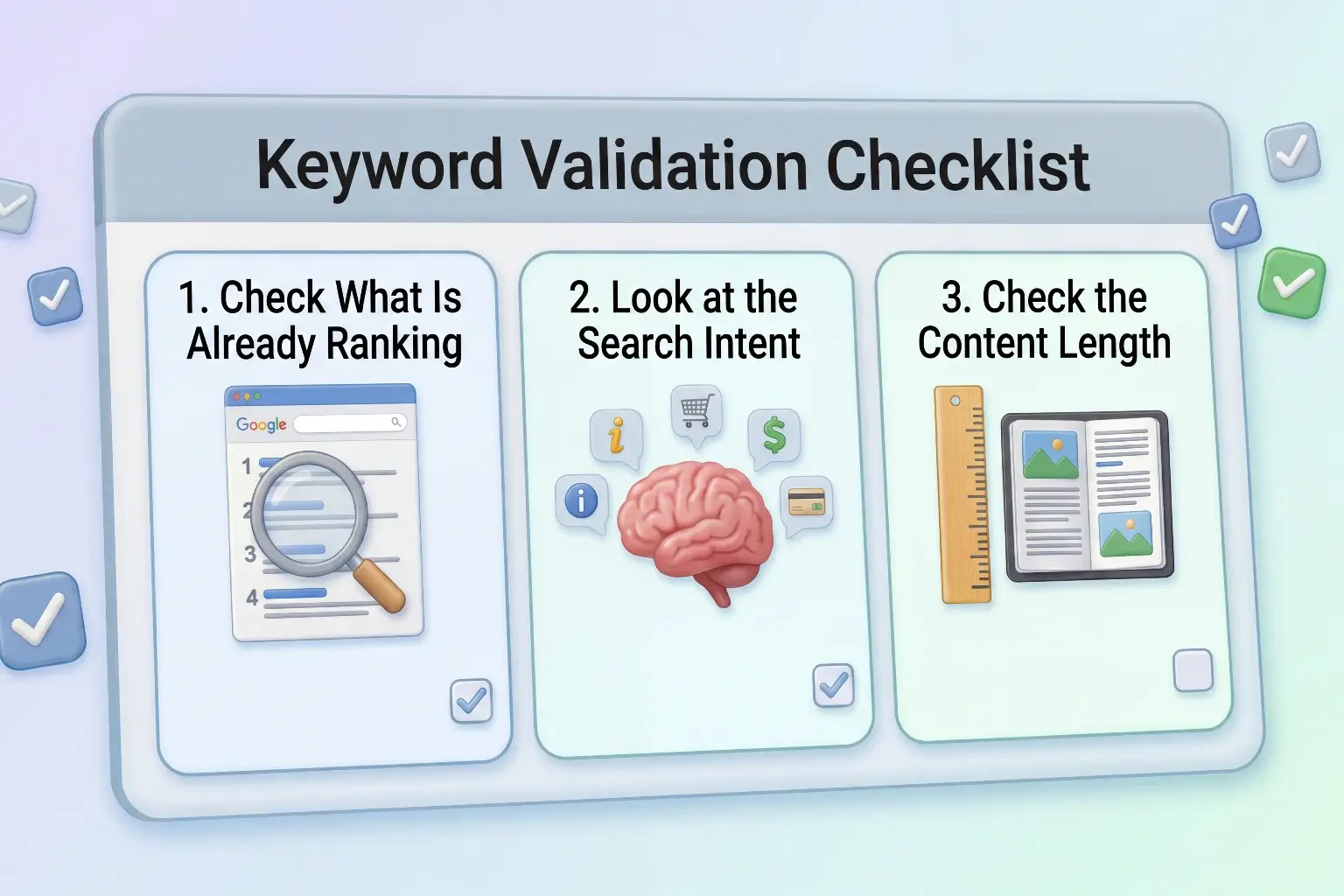
Once you have chosen a keyword, spend ten minutes validating it before you start writing. This quick step can save hours of wasted effort.
1. Check What Is Already Ranking
Search your keyword in Google and read the top three or four results carefully. What topics do they cover? How long are the articles? What questions do they answer?
This tells you two things. First, it confirms that Google is sending traffic to this type of content. Second, it shows you what the reader expects, so you can write something equally helpful or better.
2. Look at the Search Intent
Make sure the content that is ranking matches the type of article you plan to write. If all the top results are listicles and you are planning a long tutorial, there may be a mismatch. Adjust your article format to match what Google is already rewarding for that keyword.
Understanding search intent becomes much easier when you use AI tools correctly. If you’re new, start with this guide on How to use AI tools as a beginner.
3. Check the Content Length
Look at how long the top-ranking articles are. If the top results are all 1500 to 2500 words, a very short article is unlikely to compete. Aim to match or exceed the depth of what is already ranking, while making your content more useful and beginner-friendly.
How to Organize Your Keywords Into a Content Plan

Finding one keyword is good. Building a keyword map for your entire blog is even better.
After you go through this process for one article, do it for your next five to ten article ideas. You will start to see patterns – groups of related keywords that naturally connect. These groups become your content clusters.
For example, if your blog is about AI and blogging, your keyword cluster might look like this:
- How to start a blog using AI
- How to do keyword research for blogging
- How to create a content plan using AI
- How to get traffic to your blog using AI
- How to build topical authority for your blog
Each of these is a separate article targeting a specific keyword. Together, they form a cluster that tells Google your blog covers the topic of AI blogging deeply and comprehensively. That cluster effect is one of the strongest ranking signals for newer blogs.
You can read more about this in How to Create a Content Plan for Your Blog Using AI.
Best Tools for Keyword Research in 2026
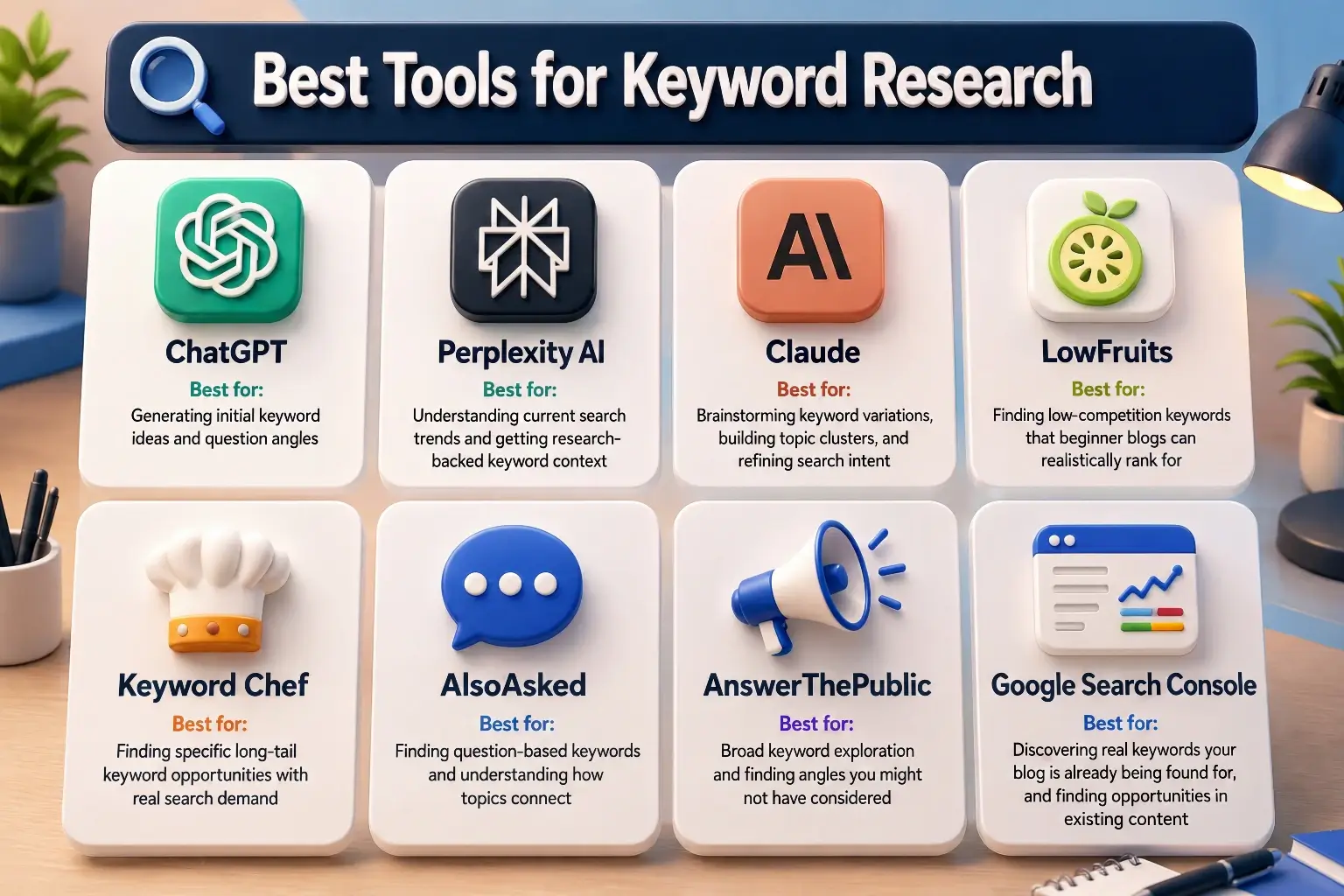
You do not need to use all of these. Pick two or three that fit your workflow and learn them well.
1. ChatGPT
ChatGPT is your starting point for generating keyword ideas quickly. It is not a dedicated keyword tool, but it is excellent at brainstorming angles, generating question-based keyword ideas, and helping you think from your reader’s perspective. Use it to create a raw list of ideas that you then validate with more specific tools.
Best for: Generating initial keyword ideas and question angles.
2. Perplexity AI
Perplexity AI works like a research assistant that searches the web and gives you sourced answers. You can use it to understand what people are currently searching for on a topic and what kinds of content are performing well. It gives you real-time context that helps make your keyword research more current and relevant.
Best for: Understanding current search trends and getting research-backed keyword context.
3. Claude
Claude is a strong tool for keyword research when you want deeper brainstorming, clearer topic grouping, and more natural content ideas. It is especially useful for expanding one seed topic into many related keyword angles, organizing keywords into clusters, and refining search intent before you validate everything in other tools.
Best for: Brainstorming keyword variations, building topic clusters, and refining search intent.
4.LowFruits
LowFruits is one of the best tools specifically designed for beginner bloggers. It scans Google search results and identifies keywords where the competing content is weak. When it finds keywords where forums, small blogs, or low-authority sites are ranking on page one, it flags them as opportunities. These are the keywords where a new blog has the most realistic chance of ranking.
Best for: Finding low-competition keywords that beginner blogs can realistically rank for.
5. Keyword Chef
Keyword Chef specializes in finding long-tail keywords. It uses a credit-based system to pull thousands of keyword variations and then filters them to show you questions and phrases that are both specific and searchable. It is particularly useful for finding content gaps that competitors have missed.
Best for: Finding specific long-tail keyword opportunities with real search demand.
6. AlsoAsked
AlsoAsked pulls the “People Also Ask” questions directly from Google for any topic you search. These questions are genuine search queries that real users are typing. Each one is a potential keyword and article idea. The tool also shows how questions connect to each other, which helps you understand how topics cluster together.
Best for: Finding question-based keywords and understanding how topics connect.
7. AnswerThePublic
AnswerThePublic generates a visual map of all the questions, prepositions, and comparisons that people search around a specific topic. It is especially useful early in the keyword research process when you are trying to understand all the different angles your readers might approach a topic from.
Best for: Broad keyword exploration and finding angles you might not have considered.
8. Google Search Console
Google Search Console is the most underused keyword research tool for bloggers who already have published content. Once your articles are indexed, Search Console shows you exactly which search queries are triggering your pages. You can see keywords that are bringing impressions but not clicks, which tells you where to optimize existing articles or write new supporting content.
Best for: Discovering real keywords your blog is already being found for, and finding opportunities in existing content.
Keyword research tells you what to write. But how you organize those keywords into a connected content structure is what actually builds lasting rankings. Our guide on How to Build Topical Authority for Your Blog covers exactly how to do that.
Common Keyword Research Mistakes Beginners Make
Understanding mistakes is just as important as knowing the right steps.
The first mistake is targeting keywords that are too broad. Beginners often choose short keywords like “AI tools” or “blogging tips” because they seem popular. But these are dominated by massive websites with years of authority. A narrower, more specific keyword gives a new blog a far better chance.
The second mistake is ignoring search intent. Choosing a keyword with decent search volume but then writing the wrong type of article for it is a common problem. If people searching a keyword want a comparison article and you write a tutorial, Google will not rank your content even if everything else is done correctly.
The third mistake is choosing keywords based on what sounds good rather than what people actually search. Just because a phrase sounds professional or clever does not mean anyone is typing it into Google. Always validate that real searches exist before building an article around a keyword.
The fourth mistake is targeting only one keyword per article and missing related keywords naturally. Every article can rank for multiple related keywords if the content is thorough and well-structured. Naturally including related phrases throughout your article gives it more ranking opportunities without any extra effort.
The fifth mistake is doing keyword research once and then stopping. Keyword opportunities change. New tools launch, trends shift, and your readers evolve. Building a habit of checking new keyword opportunities regularly keeps your content strategy fresh and growing.
Once you find the right keywords, the next step is turning them into content. Learn more in our guide How to use AI for content creation effectively.
Simple Keyword Research Workflow for Bloggers
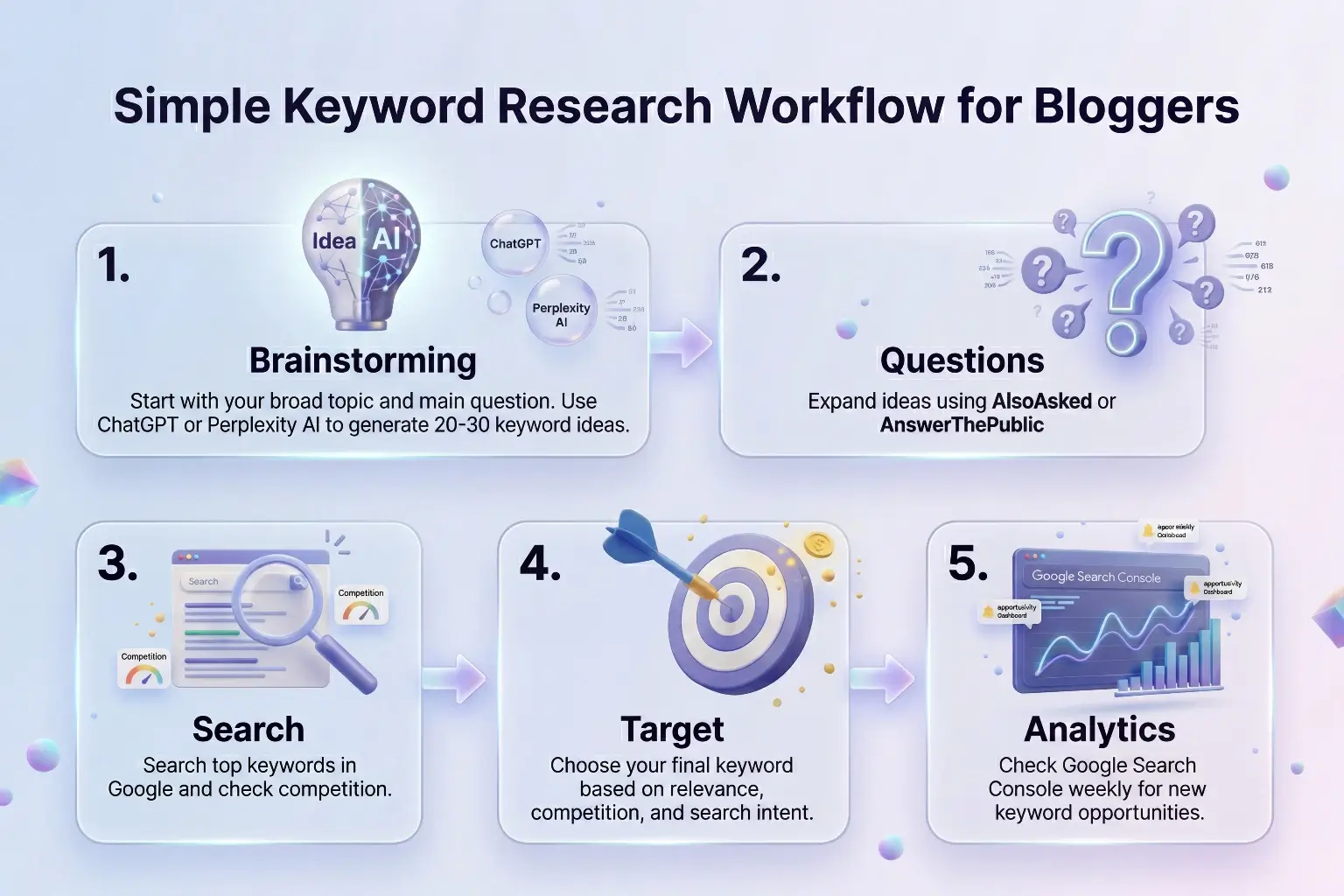
Here is the complete workflow you can follow for every new article.
- Start by writing down your broad topic and the main question your reader has. Then take that to ChatGPT or Perplexity AI and generate twenty to thirty keyword ideas. Look through the list and highlight the ones that feel specific, relevant, and beginner-friendly.
- Next, take your best ideas to AlsoAsked or AnswerThePublic to expand into question-based versions. Add the strongest questions to your list.
- Then search your top three to five keywords in Google and check what is ranking. Look for signs of low competition – smaller sites, older content, or thin articles. Use LowFruits or Keyword Chef if you want a more detailed competition check.
- Choose your final keyword based on the combination of relevance, realistic competition, and clear search intent. Write it down and build your article around it.
- After you have published several articles, check Google Search Console weekly to see which queries are already finding your content. Use this data to refine existing articles and find new keyword opportunities.
Over time, this workflow becomes fast and natural. The first few times will feel slow. By the tenth article, it will feel like a normal part of your writing process.
Finding the right keyword is step one. Using it correctly inside your article is step two. Our guide on On-Page SEO for Blog Posts explains exactly where your keyword should go and how every other element of your article should be optimized.
Final Thoughts
Keyword research is not a complicated technical skill reserved for SEO experts. It is a practical habit that tells you what your readers are looking for before you spend time writing.
Every article you publish without keyword research is a guess. Every article you publish with keyword research is a decision based on real data.
AI makes this process faster and more accessible than ever. You do not need expensive software or years of experience. You need a clear topic, a few simple tools, and the habit of doing this before every article rather than after.
Start with your next article. Before you write a single word, spend twenty minutes going through the steps in this guide. Find your keyword, validate it, and then write. You will notice the difference in how focused and purposeful your writing feels when you know exactly what your reader is searching for.
That focused, intentional approach to content is what separates blogs that grow from blogs that stay invisible.
For the full picture of how to grow your blog traffic beyond just keyword research, the article How to Get Traffic to Your Blog Using AI on Arthify is the best next step – it covers everything from on-page SEO to how AI tools can help you drive consistent organic growth.
Frequently Asked Questions
What is keyword research for blogging?
Keyword research for blogging is the process of finding the exact words and phrases that people type into search engines. By building your articles around these keywords, you give your content a real chance of appearing in search results and attracting consistent organic traffic.
Why is keyword research important for beginner bloggers?
Without keyword research, you are guessing what your readers want. Keyword research removes the guesswork and tells you exactly what people are searching for, which means every article you write has a much higher chance of reaching real readers through search engines.
How do I find easy keywords to rank for as a beginner?
Focus on long-tail keywords — longer, more specific phrases with lower competition. Tools like LowFruits and Keyword Chef are specifically designed to find keywords where smaller sites are already ranking, which shows that a newer blog has a realistic chance of ranking too.
Can I use AI for keyword research?
Yes. AI tools like ChatGPT and Perplexity AI are very useful for generating keyword ideas, understanding search intent, and thinking from your reader’s perspective. Use them to build your initial keyword list and then validate the best ideas with dedicated research tools.
How many keywords should I target in one blog post?
Focus on one primary keyword per article. Build the article around that keyword, but naturally include related phrases throughout the content. A well-written, thorough article will often rank for dozens of related keywords without any extra effort.
What is the difference between long-tail and short-tail keywords?
Short-tail keywords are broad and short, like “keyword research.” They have high search volume but very high competition. Long-tail keywords are longer and more specific, like “how to do keyword research for a beginner blog.” They have lower search volume but much lower competition, making them far more realistic targets for newer blogs.
How often should I do keyword research?
Do keyword research before writing every new article. Also check Google Search Console weekly to see which queries are already finding your existing content. This helps you find new opportunities and improve articles that are close to ranking.
How long does keyword research take?
Using the AI-powered process in this guide, you can go from a blank topic to a chosen keyword and a full article outline in 45 to 60 minutes. As you get more comfortable with the tools and process, it becomes even faster.

Hi, I’m Harshil Patel, founder of Arthify.
I share simple, practical guides on AI tools, blogging, and online earning to help beginners work smarter and grow online.
My goal is to simplify AI tools so anyone can build skills and create opportunities in the digital world.