
“This beginner-friendly guide explains how to use AI for daily productivity in 2026, including practical use cases, simple workflows, and tips to save time without feeling overwhelmed.”
If you are new to AI, one of the biggest questions is not which tool is best. The real question is much simpler: How can AI actually help you in everyday life?
AI tools are no longer just for experts. In 2026, beginners can use AI to save time, work faster, and stay more productive every day. Whether you want to write better, plan your tasks, or find information quickly, AI tools can help you do it easily. In this guide, you’ll learn exactly how to use AI for daily productivity step by step. That is where daily productivity comes in.
You do not need to be a developer, marketer, or technical expert to use AI productively. In fact, the best beginner use cases are often very simple. AI can help you write emails, summarize information, organize tasks, plan your day, prepare notes, and save time on repeated work. Official product pages from ChatGPT, Google Workspace with Gemini, Microsoft 365 Copilot, and Claude all now position their tools around everyday work and productivity, not just casual chat.
Instead of explaining AI in general, this guide shows how beginners can use AI for real daily productivity.
If you’re completely New to AI tools, we recommend starting with our step-by-step guide on How to use AI tools as a beginner in 2026.
What Does AI Productivity Really Mean
AI productivity means using AI tools to save time, reduce effort, and complete everyday tasks more efficiently.
This does not mean AI replaces your thinking. It means AI helps you do routine work faster and more clearly.
For beginners, AI productivity usually starts with simple tasks like:
- Improving writing
- Planning work
- Organizing ideas
- Summarizing long text
- Preparing notes
- Finding information faster
This is why AI productivity is such a strong beginner topic. It is not about chasing trends. It is about using AI for useful daily work.
For example, instead of spending 2 hours writing an article, you can use AI to create an outline in minutes and finish faster.
Why AI Can Help Beginners Work Better
AI helps beginners because it lowers the effort needed to start many tasks. Instead of beginning with a blank page, you can begin with a draft. Instead of reading a long document from start to finish first, you can ask for a summary. Instead of trying to organize a messy to-do list alone, you can ask AI to turn it into a simple plan.
This is one reason so many AI companies are now focusing on productivity features. ChatGPT help in Search, advanced data analysis, and other workflow features. Gemini can help with planning, brainstorming, and drafting in its app and across Workspace. Microsoft 365 Copilot helps streamline tasks and uncover insights across its apps.
For a beginner, the biggest advantage is simple: AI helps you start faster and work with more structure.
Best Ways to Use AI for Daily Productivity
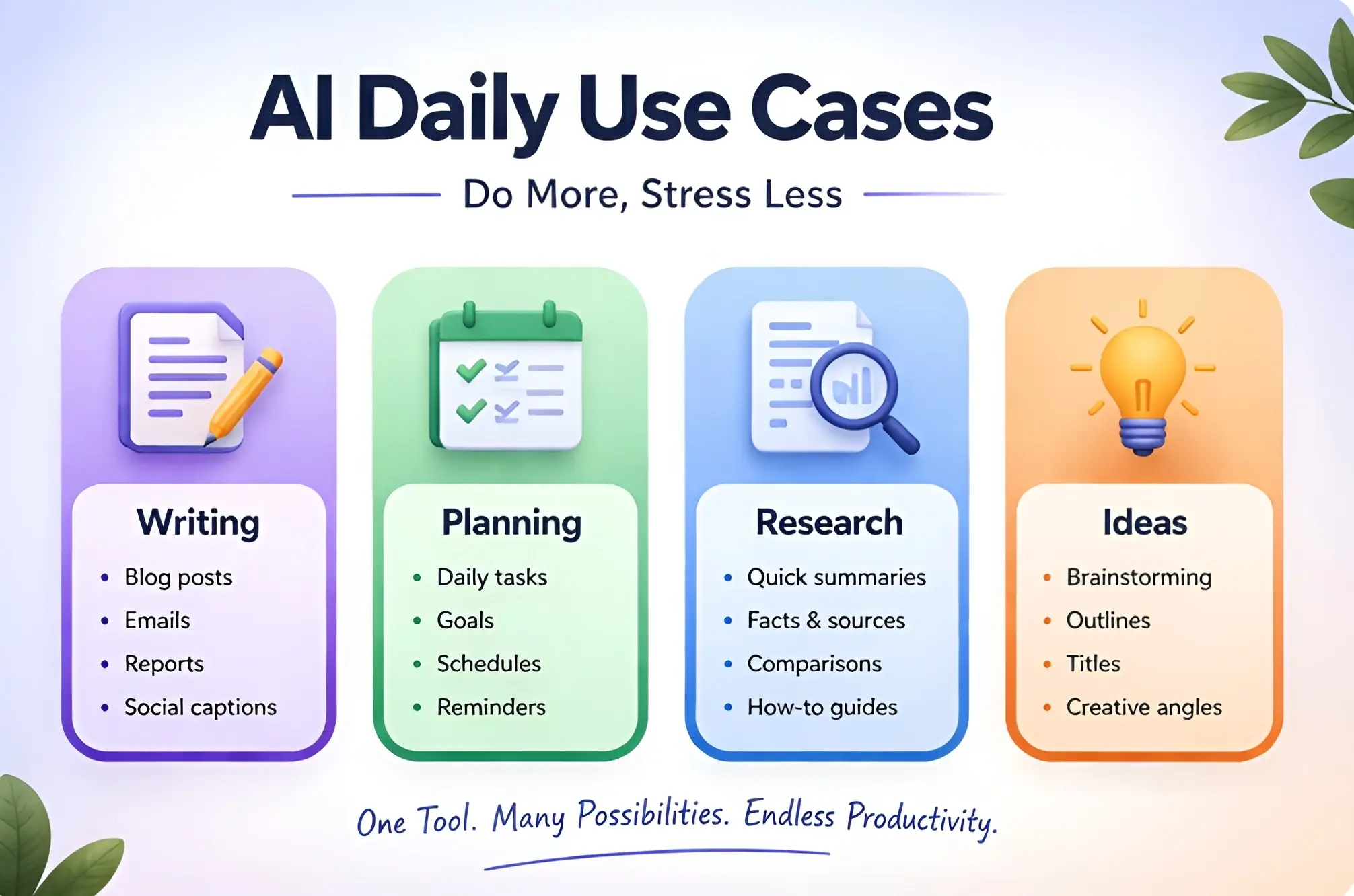
Writing and Rewriting
This is one of the easiest places to begin. AI can help draft emails, improve rough writing, rewrite awkward sentences, and turn notes into cleaner text.
This is useful if you often:
- Write emails
- Create notes
- Prepare short documents
- Rewrite rough drafts
- Make text simpler and clearer
Planning and Scheduling
AI can help organize your day, break large goals into smaller steps, and build simple routines. You can ask it to create a study plan, a work checklist, or a weekly schedule.
If you’re working on a blog or content strategy, planning your content in advance is important. Learn more in our guide on How to create a content plan for your blog using AI.
Research and Summaries
AI can help you understand information faster. You can use it to summarize long text, simplify complex topics, and compare options.
Meetings and Notes
If you work with meeting notes, class notes, or project notes, AI can turn them into cleaner summaries, action points, or short briefs.
Idea Generation
AI is also useful when you are stuck. It can suggest ideas for writing, problem-solving, planning, and content. This makes it helpful not only for work, but also for learning and personal productivity.
Content creation is one of the most common uses of AI. Learn how in our AI content creation guide.
How to Use AI for Planning and Organization
You can ask AI to:
- Turn a messy task list into priorities
- Build a weekly study plan
- Create a work checklist
- Organize project steps
- Break one big goal into smaller actions
For example:
“Turn these 8 tasks into a simple plan for today and order them by importance.”
That kind of prompt gives immediate value.
This is where AI becomes more than a chatbot. It starts acting like a planning assistant.
Better prompts can significantly improve your daily workflow. Learn how in our AI prompt writing guide.
How to Use AI for Writing and Email Tasks
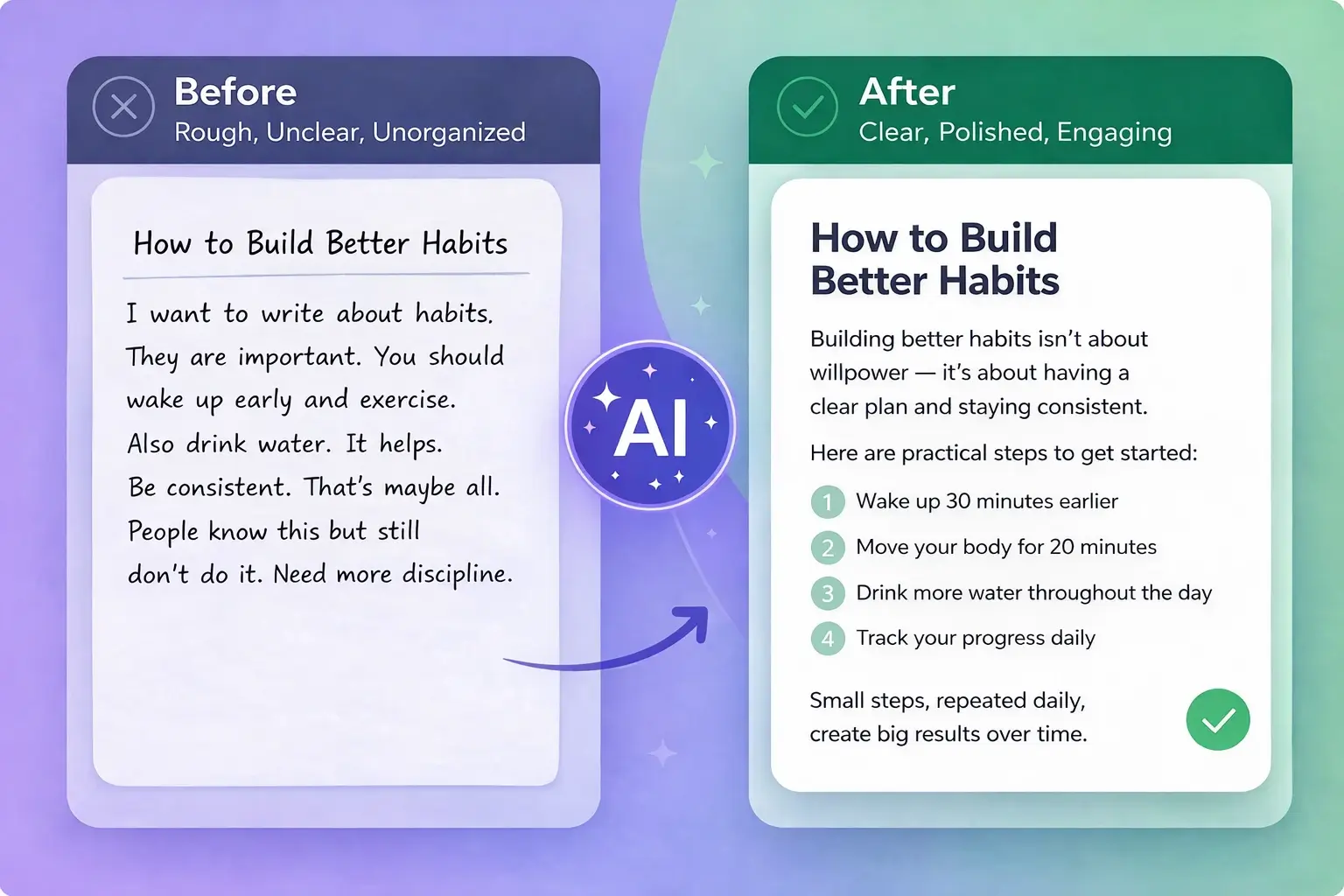
One of the most practical beginner use cases is writing support.
You can use AI to:
- Draft a polite email
- Rewrite a message more clearly
- Shorten a long paragraph
- Make writing more professional
- Change tone from casual to formal
For example, instead of typing:
“Help me write an email”
you can write:
“Write a short and polite email to my manager asking for one extra day to finish a task.”
That level of clarity usually gives much better output.
If writing is your biggest productivity need, you should also link this section to Best AI Writing Tools for Beginners.
How to Use AI for Research and Information
AI is also helpful for reducing information overload.
Beginners can use AI to:
- Summarize articles
- Simplify difficult concepts
- Compare two options
- Explain a topic in simple English
- Turn long notes into bullet points
This is useful for students, bloggers, freelancers, and anyone who deals with large amounts of information.
For example:
“Summarize these notes into 5 clear bullet points.”
“Explain SEO in simple English for beginners.”
That type of use saves time and improves understanding.
Students can use AI for better productivity. Learn more in our AI tools for students guide.
How to Use AI for Meetings, Notes, and Summaries
Many people lose time because their notes are messy. AI can help clean this up.
You can paste rough notes and ask AI to:
- Organize them
- Turn them into action points
- Remove repetition
- Write a short summary
- Create follow-up tasks
This works for:
- Class notes
- Meeting notes
- Content ideas
- Project notes
It is one of the easiest ways to feel real productivity gains quickly.
For anyone who uses AI tools to produce written content regularly, learning on-page SEO makes every piece of content work harder for you. Our guide on On-Page SEO for Blog Posts covers the complete optimization process.
Best AI Tools for Daily Productivity in 2026
1. ChatGPT
ChatGPT is one of the strongest all-purpose productivity tools for beginners. it can help with explaining concepts, drafting, rewriting, summarizing, reasoning, and more.
Best for:
- General writing
- Planning
- Summaries
- Idea generation
- Flexible daily use
Many people use ChatGPT for daily tasks like writing, planning, and problem-solving. If you’re new, check our guide on How to use ChatGPT for beginners.
2. Claude
Claude is a strong option for people who want calm, structured output. it can be very useful in real work, especially for writing, reasoning, and productivity-related tasks.
Best for:
- Long-form summaries
- Structured planning
- Clearer writing
- Thoughtful analysis
Claude is another powerful tool for structured thinking and long-form writing. Learn how to use it step by step in our Claude AI beginner guide.
3. Gemini
Gemini is especially useful if you already work in Google’s ecosystem. Workspace with Gemini helps with drafting, revising, planning, and brainstorming across apps.
Best for:
- Gmail drafting
- Google Docs work
- Planning in Google tools
- Everyday productivity for Google users
You can also explore our list of the Best new AI tools in 2026 to discover more tools that can improve your productivity.
4. Microsoft Copilot
Microsoft 365 Copilot is built for productivity across work apps like Word, Excel, PowerPoint, Outlook, and more. it helps streamline tasks and provides contextual assistance in the flow of work.
Best for:
- Office productivity
- Document workflows
- Spreadsheet and presentation help
- Microsoft users
5. Notion AI
Notion AI is useful if you already plan your tasks, notes, and work inside Notion. It is especially practical for organizing written information and improving text inside the same workspace.
Best for:
- Note-taking
- Planning
- Internal writing
- Task organization
The same AI tools that improve your daily productivity can also help you earn online. Our guide on How to Make Money with AI in 2026 shows you how to turn those skills into income.
Common Mistakes Beginners Make
Beginners usually make the same mistakes when using AI for productivity.
The first mistake is trying too many tools too quickly. This creates confusion instead of progress.
The second mistake is using vague prompts. If you ask vaguely, the output will usually be weak.
The third mistake is trusting everything without checking it. AI helps a lot, but it still needs human review.
The fourth mistake is using AI only for random fun and never for repeated daily tasks. Productivity improves most when AI becomes part of a simple routine.
Use AI when:
- You want speed
- You need ideas
- You want to simplify tasks
Avoid AI when:
- You need personal experience
- You need critical decisions
- You need deep expertise
If you’re using AI for blogging or content creation, learning how to drive traffic is just as important. Here’s a complete guide on How to get traffic to your blog using AI.
Simple AI Productivity Workflow for Beginners
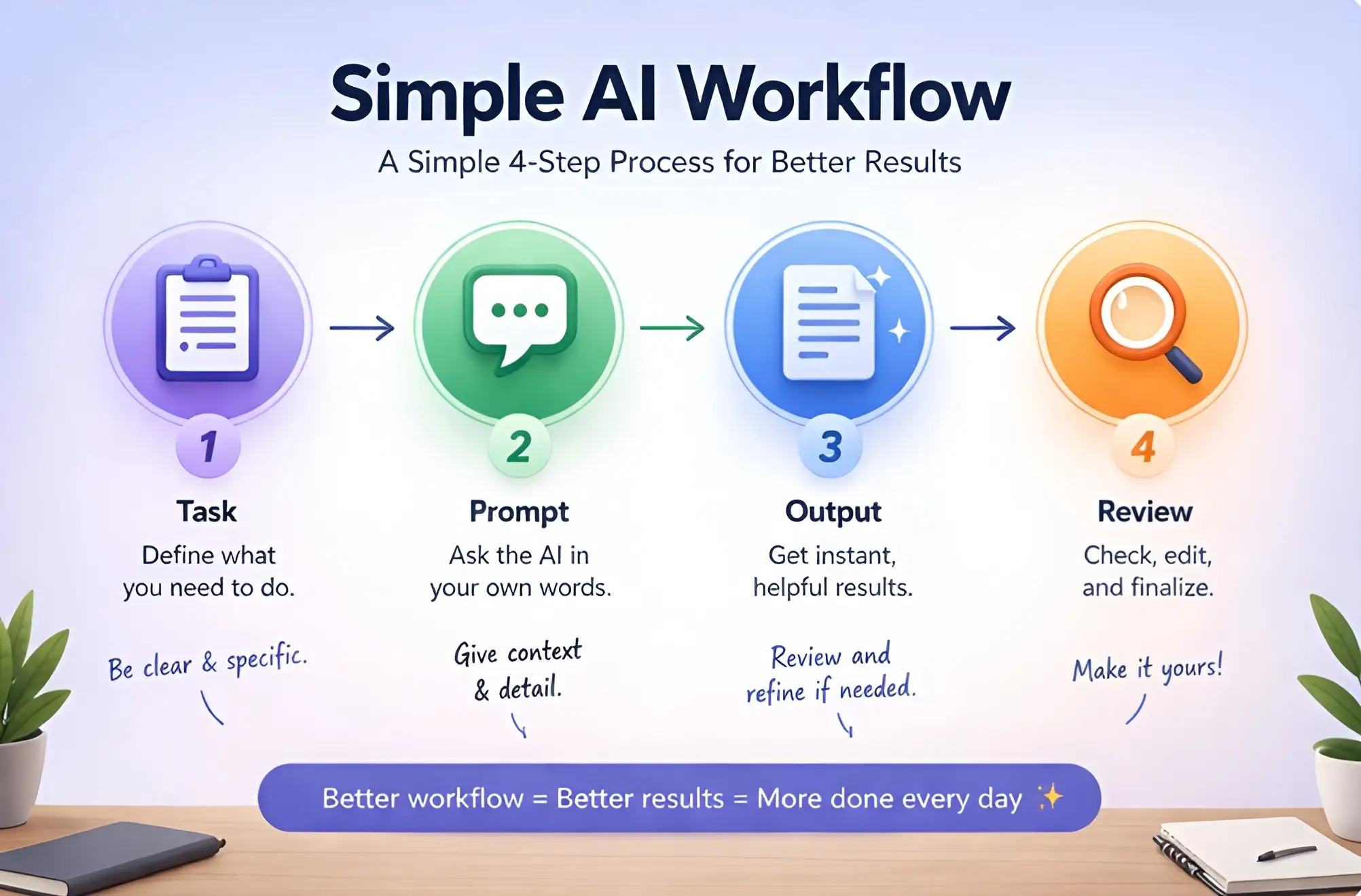
Step 1: Start with one repeated task
Choose one thing you already do often, like writing emails, making notes, or planning your day.
Step 2: Pick one AI tool
Do not start with five tools. Pick one. For most beginners, ChatGPT or Claude is enough.
Step 3: Write a simple prompt
Be clear. Example:
“Turn these rough notes into a short to-do list for today.”
Step 4: Review and improve the output
Check accuracy, remove anything weak, and adjust the response.
Step 5: Turn it into a habit
If a use case saves time, repeat it. This is how AI becomes a productivity tool.
If you’re planning to use AI for something more structured, like building a blog or online content system, check our step-by-step guide on How to start blogging with AI.
Final Thoughts
The best way to use AI for daily productivity is not to overcomplicate it.
Start with one repeated task. Use one AI tool. Write a better prompt. Review the output. Then use it again tomorrow. That is how real productivity improvement happens.
For beginners, the goal is not to automate your entire life in one day. The goal is to use AI in small, useful ways that make your daily work easier.
If you already explored How to Use ChatGPT for Beginners and How to Use Claude AI for Beginners, this article should help you move from learning the tools to using them practically every day.
Frequently Asked Questions
What does AI productivity mean?
AI productivity means using AI tools to save time, improve work quality, and complete daily tasks more efficiently.
What is the best AI tool for daily productivity?
For most beginners, ChatGPT and Claude are strong starting points, while Gemini and Copilot are especially useful if you already work inside Google or Microsoft tools.
Can beginners use AI for work planning?
Yes. AI is very useful for organizing tasks, building schedules, prioritizing work, and turning messy notes into structured plans.
What is the latest Claude model in 2026?
The latest major Claude models include Claude Sonnet 4.6 and Claude Opus 4.6, both announced by Anthropic in early 2026
Is AI useful for email writing and summaries?
Yes. AI can help draft emails, improve tone, summarize information, and clean rough notes. Google and OpenAI both officially highlight these kinds of productivity uses.
Do I need more than one AI tool for productivity?
No. One tool is enough at the start. It is better to learn one tool properly before adding more.
Can AI replace my work completely?
No. AI is best used as a support tool. It helps with speed and structure, but you still need judgment, review, and decision-making.

Hi, I’m Harshil Patel, founder of Arthify.
I share simple, practical guides on AI tools, blogging, and online earning to help beginners work smarter and grow online.
My goal is to simplify AI tools so anyone can build skills and create opportunities in the digital world.